
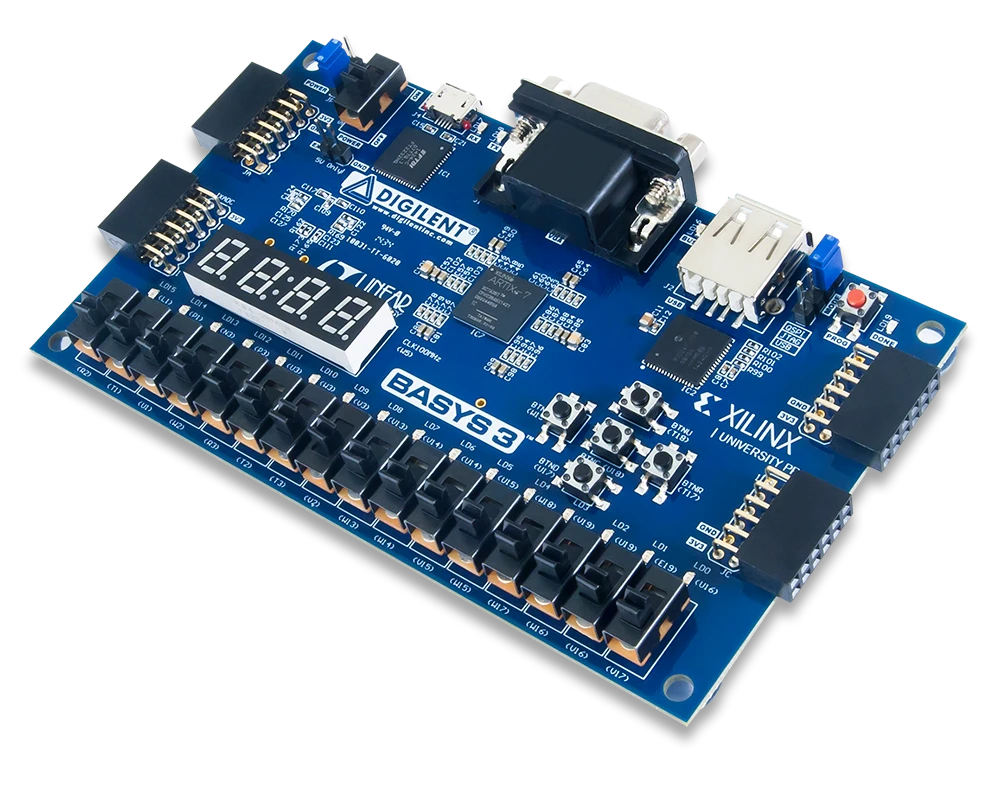
THE FPGA BUYING GUIDE
The best FPGA development boards for beginners and students are not the ones with the biggest chips. They are the ones that match your course, your toolchain and the first ten projects you will actually build. For most people that means a Digilent Basys 3. For a tight budget or an open-source workflow, it means a Sipeed Tang Nano 20K.
The short answer: buy the Basys 3 for an intro digital logic class or self-study in Verilog or VHDL. Step up to the Nexys A7-100T if a later course needs DDR memory, Ethernet or a soft-core processor. Choose the Arty A7-100T if you want to build embedded systems around MicroBlaze or RISC-V, the Zybo Z7-20 if you want an Arm processor running Linux next to the FPGA, and the Tang Nano 20K if price or open-source tools matter most.
Ask first, buy second. If you are enrolled in a class, find out which board the lab handouts assume. Constraint files, pin maps and starter projects are written for one board, and matching it saves you a week of porting.
As an Amazon Associate I earn from qualifying purchases. Affiliate policy.
Five FPGA boards for five kinds of beginner
Each button goes to the exact Amazon US listing for the board on its card. Board names get reused across variants (Z7-10 and Z7-20, A7-35T and A7-100T), so confirm the variant and the seller before you pay. These picks come from maker specifications and listing checks, not from hands-on testing.
BEST FIRST BOARD FOR A DIGITAL LOGIC COURSE
Digilent Basys 3
Exact model: 410-183
AMD Artix 7 XC7A35T · 33,280 logic cells · No external RAM (1,800 Kb block RAM) · 32 Mb SPI flash · 12-bit VGA · 4 Pmod ports · Vivado free edition
If you are taking an intro digital design class, or teaching yourself Verilog from the ground up, this is the board I would point you to first. Every early lab, from a full adder to a stopwatch to a UART, has somewhere obvious to land on it.
Why it made the list · Pros & cons
BEST IF YOUR COURSEWORK GOES BEYOND THE FIRST SEMESTER
Digilent Nexys A7-100T
Exact model: 410-292
AMD Artix 7 XC7A100T · 15,850 slices (101,440 logic cells) · 128 MiB DDR2 · 16 MB Quad-SPI flash · 12-bit VGA · 4 Pmod ports plus XADC Pmod · Vivado free edition
The board to buy if you expect to use it for more than one class. It keeps the Basys 3’s switches, LEDs and displays, then adds three times the logic, DDR2 memory, Ethernet and a set of sensors.
Why it made the list · Pros & cons
BEST FOR SOFT-CORE CPUs AND EMBEDDED PROJECTS
Digilent Arty A7-100T
Exact model: 410-319
AMD Artix 7 XC7A100T · 101,440 logic cells · 256 MB DDR3L · 16 MB Quad-SPI flash · No onboard video port · 4 Pmod ports plus Arduino/chipKIT header · Vivado free edition
Same FPGA as the Nexys A7, twice the external memory and far fewer switches and lights. It suits people who want to build a RISC-V or MicroBlaze system and wire it to their own hardware, not people working through a lab manual.
Why it made the list · Pros & cons
BEST FOR ARM PLUS FPGA AND EMBEDDED LINUX
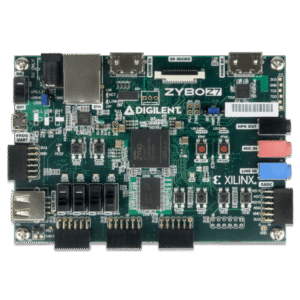
Digilent Zybo Z7-20
Exact model: Zybo Z7-20
AMD Zynq 7000 XC7Z020 with dual-core Arm Cortex-A9 (667 MHz) · 85K logic cells · 1 GB DDR3L · 16 MB Quad-SPI flash · HDMI input and HDMI output · 6 Pmod ports · Vivado free edition, Vitis and PetaLinux
Pick this when the goal is hardware and software together: an Arm processor running Linux or bare-metal code, with custom accelerators in the FPGA fabric beside it. It is overkill for learning gates and flip-flops.
Why it made the list · Pros & cons
BEST LOW-COST BOARD AND BEST FOR OPEN-SOURCE TOOLS
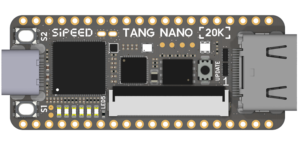
Sipeed Tang Nano 20K
Exact model: Tang Nano 20K
Gowin GW2AR-LV18QN88 · 20,736 LUT4 · 64 Mbit SDRAM · 64 Mbit flash · HDMI connector and 40-pin RGB LCD connector · Pin headers · Gowin EDA or Yosys with nextpnr
A fraction of the price of the Digilent boards, small enough to plug into a breadboard, and supported by a fully open-source toolchain. It is the board for hobbyists, retro gaming projects and anyone on macOS or Linux who would rather not install Vivado.
Why it made the list · Pros & cons
FPGA development boards compared side by side
Every number below comes from the board maker’s published specifications or, for the Zynq device, from AMD’s product table. Logic is listed the way each vendor states it, which is why the Tang Nano row reads in LUT4 while the others read in logic cells.
| Board | FPGA | Logic | Block RAM | DSP / multipliers | External memory | Built-in user I/O | Video | USB cable in box |
|---|---|---|---|---|---|---|---|---|
| Basys 3 Starting point | Artix 7 XC7A35T | 33,280 logic cells | 1,800 Kb | 90 DSP | None | 16 switches, 16 LEDs, 5 buttons, 4-digit 7-segment | VGA | No |
| Nexys A7-100T | Artix 7 XC7A100T | 101,440 logic cells | 4,860 Kb | 240 DSP | 128 MiB DDR2 | 16 switches, 16 LEDs, two 4-digit 7-segment, sensors | VGA | Yes |
| Arty A7-100T | Artix 7 XC7A100T | 101,440 logic cells | 4,860 Kb | 240 DSP | 256 MB DDR3L | 4 switches, 4 buttons, 4 LEDs, 4 RGB LEDs | None | No |
| Zybo Z7-20 | Zynq 7000 XC7Z020 | 85K logic cells + dual Cortex-A9 | 4.9 Mb | 220 DSP | 1 GB DDR3L | 4 switches, 6 buttons, 5 LEDs, 2 RGB LEDs | HDMI in and out | No |
| Tang Nano 20K | Gowin GW2AR-18 | 20,736 LUT4 | 828 Kb | 48 (18×18) | 64 Mbit SDRAM | 6 LEDs, 2 buttons, 1 RGB LED | HDMI connector, RGB LCD | Not stated |
Sources: Digilent product pages for each Digilent board, the AMD Zynq 7000 product page for XC7Z020 resources, and the Sipeed wiki for the Tang Nano 20K. Checked November 28, 2026.
What software each board needs on your computer
The board is the cheap part of learning FPGA design. The toolchain is what you will spend your evenings inside, so check that your laptop can run it before you order anything.
| Toolchain | Boards in this guide | License cost | Host operating system | What to watch |
|---|---|---|---|---|
| AMD Vivado (free edition) | Basys 3, Nexys A7, Arty A7, Zybo Z7 | Free for these devices | Windows and Linux on x86-64 only | Large download and install. No native macOS version, so Mac users need a Windows or Linux PC |
| Vitis and PetaLinux | Zybo Z7 (processor side) | Free | PetaLinux runs on Linux | Only needed once you write software for the Arm cores |
| Gowin EDA | Tang Nano 20K | Free edition available; check Gowin’s terms for your use | See Gowin’s download page for supported systems | Vendor tool with the most complete device support for Gowin parts |
| Yosys, nextpnr-himbaechel, openFPGALoader | Tang Nano 20K | Free and open source | Linux and macOS, and Windows through YoWASP builds | Project Apicula lists the Tang Nano 20K as a supported board. Expect to work from the command line |
AMD publishes the exact Windows and Linux releases Vivado supports, and that list changes between versions. If your laptop runs an unlisted Linux distribution, Vivado may still install, but you will be on your own when the cable driver or a simulator library misbehaves. Digilent states on each product page that its boards here work with the free edition of Vivado, so no paid license is involved for coursework.
On the open-source side, the Project Apicula repository documents the Gowin bitstream format and lists the Tang Nano 20K among its supported boards. That route installs in minutes and runs well on a modest laptop, which is a real advantage if you are on a Mac.
How to choose your first FPGA board
If a class assigns a board, buy that one. Starter files and lab instructions assume its pins.
Vivado for Digilent boards and most textbooks. Open-source tools if you are on a Mac or want a lighter setup.
Switches and displays matter more in your first month than logic cells do.
Onboard switches and displays matter more than chip size at first
Beginners tend to compare logic cell counts, and that is the least useful number for a first board. A 4-bit adder, a traffic light controller or a reaction timer will not get anywhere near the limit of even the smallest device here. What slows you down is having nowhere to put inputs and outputs. The Basys 3 and Nexys A7 give you 16 switches and 16 LEDs, so you can set an 8-bit value and see the result instantly. On the Arty or Tang Nano, the same exercise means adding a Pmod, wiring a breadboard or sending data over UART.
When you actually need DDR memory
External DRAM becomes important when you run a soft-core processor with a real program, buffer video frames or store large datasets. Block RAM inside the FPGA is fast and easy to use, but a Basys 3 has 1,800 Kb of it, which is about 225 KB. A single 640×480 frame at 12 bits per pixel needs around 460 KB. If projects like that are on your list, the Nexys A7, Arty A7 or Zybo Z7 are the boards with memory to spare.
Simulate before you synthesize
Whatever you buy, most of your learning happens in a simulator, not on the board. Writing a testbench, watching the waveform and fixing the logic before you generate a bitstream will save you hours of staring at LEDs. Our guides on writing a basic Verilog testbench and writing a VHDL testbench walk through that loop, and the FPGA build process guide explains what happens between your HDL and the bitstream.
Pick a language, then the board follows
Every board here works with Verilog, VHDL and SystemVerilog through Vivado, while the open-source Gowin flow is strongest with Verilog. If you have not chosen a language yet, start with our Verilog tutorials, VHDL tutorials or SystemVerilog tutorials, and read getting started with FPGA development for the overall workflow.
Accessories worth buying with the board
- A micro-USB data cable for the Basys 3, Arty A7 and Zybo Z7. Charge-only cables will power the board but Vivado will not see it.
- One or two Pmod modules once you know what you want to build. A small OLED display or a button module turns the Arty into a usable lab board.
- A 5 V barrel supply for the Zybo Z7 if you plan to drive several peripherals or boot Linux regularly. Digilent says it can run from USB or an external 5 V source.
Why there is no speed benchmark in this guide
Laptop and graphics card reviews rank products with benchmark scores. FPGA boards do not have an equivalent. The maximum clock speed of a design depends on your HDL, timing constraints and how full the device is, not on the board alone, and a beginner’s design on any of these chips will meet timing at the frequencies an intro course uses. We have not run timing or build-time tests on these units and did not find an independent, like-for-like benchmark that would change the recommendations. The resource table above is the more useful comparison: logic, memory, DSP blocks and I/O are what decide whether a project fits.
Boards we looked at and left out
Several well-known beginner boards did not make the list because of what Amazon US offered on November 28, 2026, not because of the hardware. The Terasic DE10-Nano was unavailable. The DE10-Lite listing we found was priced far above Terasic’s list price and described as slightly used. The Alchitry Au+ and the Lattice iCEstick were listed by third-party sellers at roughly double their makers’ prices, and the Digilent Cmod A7 was out of stock. Any of them is worth a look if you can buy it new from the maker or an authorized distributor at a normal price.
Common questions about FPGA boards
What is an FPGA board, and how is it different from an Arduino?
An FPGA board carries a chip whose internal logic you define with a hardware description language such as Verilog or VHDL. You are designing circuits, not writing a program that runs line by line. An Arduino has a fixed microcontroller that executes your code sequentially. FPGAs are the better tool for parallel, timing-critical work such as video, high-speed interfaces or learning how a CPU is built from gates. A microcontroller is simpler and cheaper for most sensor and control projects.
What is the best FPGA board for beginners?
For most students, the Digilent Basys 3. It has enough switches, LEDs and displays for introductory labs, it works with the free edition of Vivado, and a large share of course material is written for it. If your budget is tight or you want open-source tools, the Sipeed Tang Nano 20K is the better starting point.
Is the Basys 3 still worth buying for 2027?
Yes, for its intended job. The Artix 7 is an older family, but it remains supported in current Vivado releases and is still used widely in teaching. Its limits are memory and connectivity, not age. If you already know you will need DDR or Ethernet, buy the Nexys A7-100T instead.
Do I need to pay for Vivado to use these boards?
No. Digilent states that the Basys 3, Nexys A7, Arty A7 and Zybo Z7 are supported by the free edition of Vivado. The Tang Nano 20K uses Gowin EDA or the open-source Yosys and nextpnr flow instead.
How much does an FPGA development board cost?
Entry boards range from under $50 for a Gowin board like the Tang Nano 20K to several hundred dollars for a Zynq board. Digilent’s list price for the Basys 3 was $165 when we checked on November 28, 2026. Amazon prices change and were higher than Digilent’s on some boards, so compare before you buy.
Can I learn FPGA design without buying a board?
You can learn a lot. Vivado’s built-in simulator and open-source tools such as Icarus Verilog and GHDL let you write and test HDL entirely on your computer. A board becomes important when you want to learn timing constraints, pin assignment and real I/O, and most people find a working blinking LED much more motivating than a waveform.
Which board should I get for a Verilog or VHDL course?
The one your instructor names. If there is no requirement, the Basys 3 is the safest choice for an intro course, and the Nexys A7-100T covers computer architecture and embedded systems courses that follow it.
Can I use these boards with a Mac?
Vivado has no native macOS version, so the four Digilent boards are easiest with a Windows or Linux x86-64 computer. The Tang Nano 20K works with the open-source toolchain on macOS, which makes it the simplest option for Mac users.
How we chose these boards
We started with Ubersuggest data on what people search for when they shop for a first FPGA board, then built a shortlist from boards with strong course use, active documentation and a free toolchain. Each pick was checked against its maker’s product page for the FPGA part, memory, I/O and box contents, and against its Amazon US listing for the exact variant, seller, stock and return terms on November 28 and 29, 2026. Where a listing disagreed with the maker, we used the maker’s figure and said so on the card.
These are editorial recommendations. We did not buy these units for this guide, and nothing here describes hands-on testing, timing results or build times we measured. We do not reproduce Amazon ratings or reviews. The 2027 in the title reflects the buying season; the research date above tells you when we last checked. Prices, sellers and stock change, so confirm the details on Amazon before ordering.
Read our editorial standards or send a correction. FPGA Tutorial is owned by Omar Khan. Ayesha Harris is editor in chief; this guide does not claim a specific test by her.
Board images: Digilent (Basys 3, Nexys A7, Arty A7, Zybo Z7) and Sipeed (Tang Nano 20K), from each maker’s product pages.
